Do you drive an electric car and plan your trips with Electus? There’s a way to make the trip planner simpler and more accurate: the OBD dongle. Plugged into your vehicle, it lets the app automatically retrieve your battery percentage. Here’s how it works, and the 3 compatible models we recommend.
Why plug an OBD dongle into an electric car?
The OBD port (short for On-Board Diagnostics) is the diagnostic connector found on all recent vehicles, usually under the dashboard, on the driver’s side. Mechanics use it to read data from the car.
A small OBD dongle plugs into it and sends that data to your smartphone. Electus can then access information the app can’t guess on its own: the battery percentage, the battery state of health, the cell temperature, and more.
The next question is what the app actually does with it.
What OBD changes in Electus
A trip planner that retrieves your battery percentage automatically. Once the dongle is paired, Electus’s route planner reads your vehicle’s battery percentage by itself and uses it to prepare your trip. It can then readjust the estimated arrival percentage if conditions change along the way. You no longer have to enter it manually before every departure.
Example: you start a long trip. Electus already knows your real battery level and uses it to build your charging plan, without you having to enter anything.
Up to 3 sensors displayed while driving. OBD also lets you display up to 3 sensors of your choice directly on your car’s screen, on Android Auto and Apple CarPlay.
Good to know: the in-car OBD connection requires an Electus Premium subscription.
With these features in mind, all that’s left is to download the app before choosing your dongle.
How to choose your OBD dongle
The market is full of dongles, and not all of them are suitable. Here’s what really matters:
- Bluetooth Low Energy (BLE) connection: it works with both iPhone and Android. The 3 models below all use it.
- Size: a compact model stays discreet under the steering wheel.
- Range: entry-level, mid-range or high-end, depending on how you plan to use it.
These are the criteria we used to select 3 models from different ranges.
Our 3 OBD dongles compatible with Electus
Vgate BLE — the affordable OBD dongle
The Vgate BLE is the ideal entry point if you want to try OBD without spending too much.
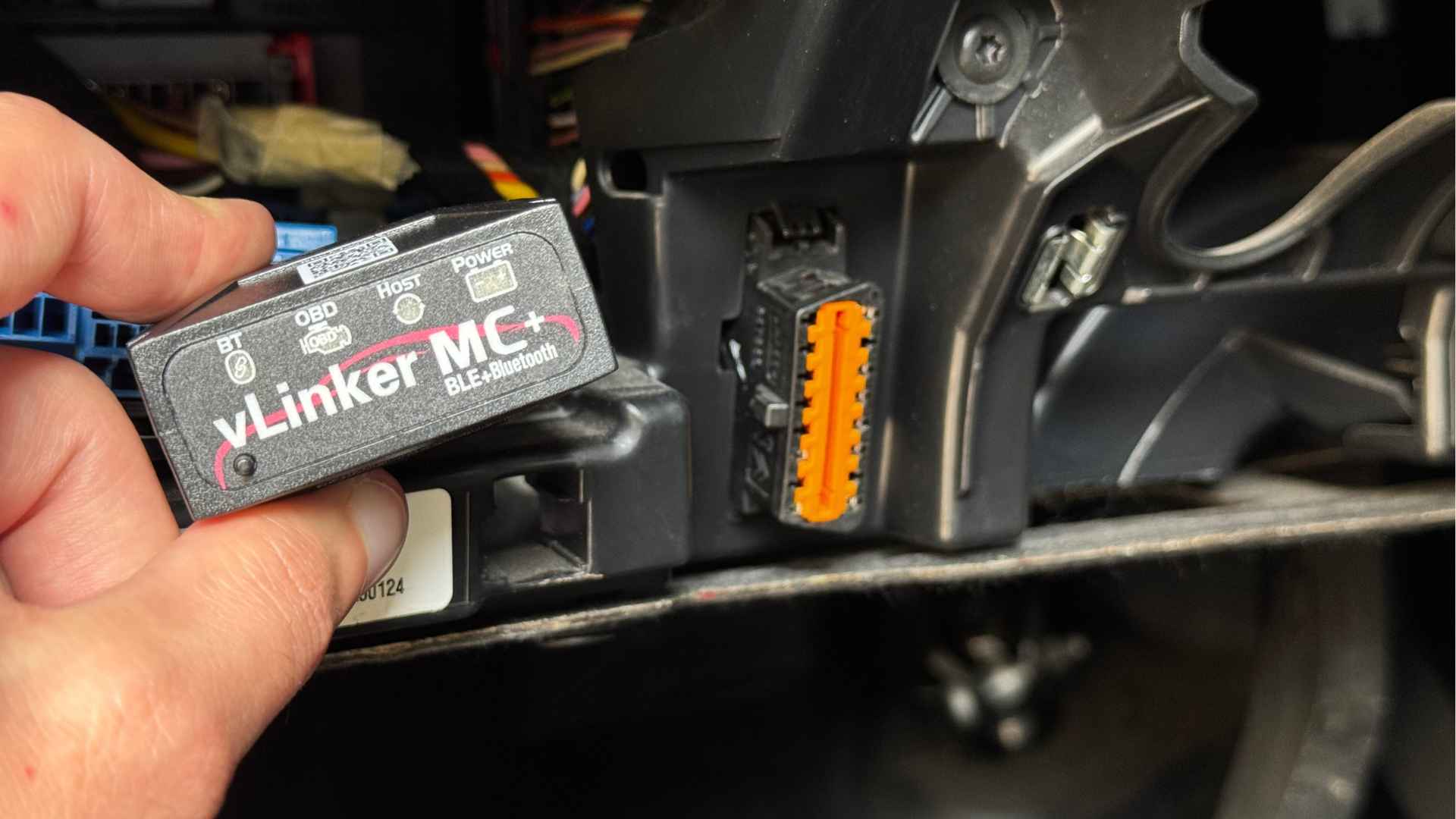
vLinker MC+ — the OBD dongle with a pairing button
The vLinker MC+ stands out with its pairing button: the connection is made deliberately, which makes it more controlled. Compatible with iOS and Android, it’s a good compromise for anyone who wants more peace of mind day to day.
OBDLink CX — the high-end OBD dongle
The OBDLink CX is the most complete model in our selection. Compatible with iOS and Android, it’s aimed at those who want a durable, reliable dongle.
Our tip: if you’re just getting started, begin with a simple model. What matters is that the planner retrieves your battery level, and you can always move up a range later.
Once you’ve chosen your dongle, all that’s left is to install it.
How to plug in and use your OBD dongle with Electus
- Locate your vehicle’s OBD port, usually under the steering wheel or near the steering column.
- Plug the dongle into the vehicle.
- Open Electus, go to the Car tab, then OBD connection. An Electus Premium subscription is required for the in-car connection.
- Once you’re in your vehicle, the connection should be automatic. Start a trip plan: the battery percentage is picked up automatically.
- Choose your sensors: in the car app settings, under OBD data, select up to 3 sensors to display while driving.
What if your car isn’t among the supported vehicles?
My vehicle isn’t compatible, what should I do?
OBD works with many vehicles, and the list keeps growing. If yours is missing, write to us at contact@electus.app with the make, model and year: this lets us look into it and expand compatibility.
In summary
The OBD dongle lets the Electus planner automatically retrieve your battery percentage, and display up to 3 sensors on Android Auto and CarPlay. With one of the 3 dongles above, you plan more simply and more calmly, whatever your budget.